Good fit when
- The workflow lives in spreadsheets, chat threads, and one person's memory.
- Managers ask for the same status update repeatedly.
- Mistakes happen during handoff rather than during decision-making.
- Training new staff takes too long because the process is undocumented.
How we build it
- 1Map the current workflow and separate judgment from handoff.
- 2Choose one painful slice for version one.
- 3Build the tracker, roles, notifications, and exports needed for that slice.
- 4Pilot with one team before rolling out more workflow coverage.
Expected outcome
Less status chasing, fewer handoff mistakes, and a process the business can actually scale.
The tool exists so the process stops living in one person's head
Most internal processes work fine until two things happen together: volume rises, and the person who holds the process in their head is busy. What breaks is rarely the decision-making. It is the handoff — a step done twice, a step skipped, a status nobody can see without asking somebody.
So an internal tool gets judged on unglamorous questions. Is this the one place the state lives? Can a manager see status without interrupting anybody? Can a new employee follow it without a tutorial? Does it stop people keeping a private spreadsheet on the side? If the answer to the last one is no, the tool is not finished yet.
Admin screens are most of the build
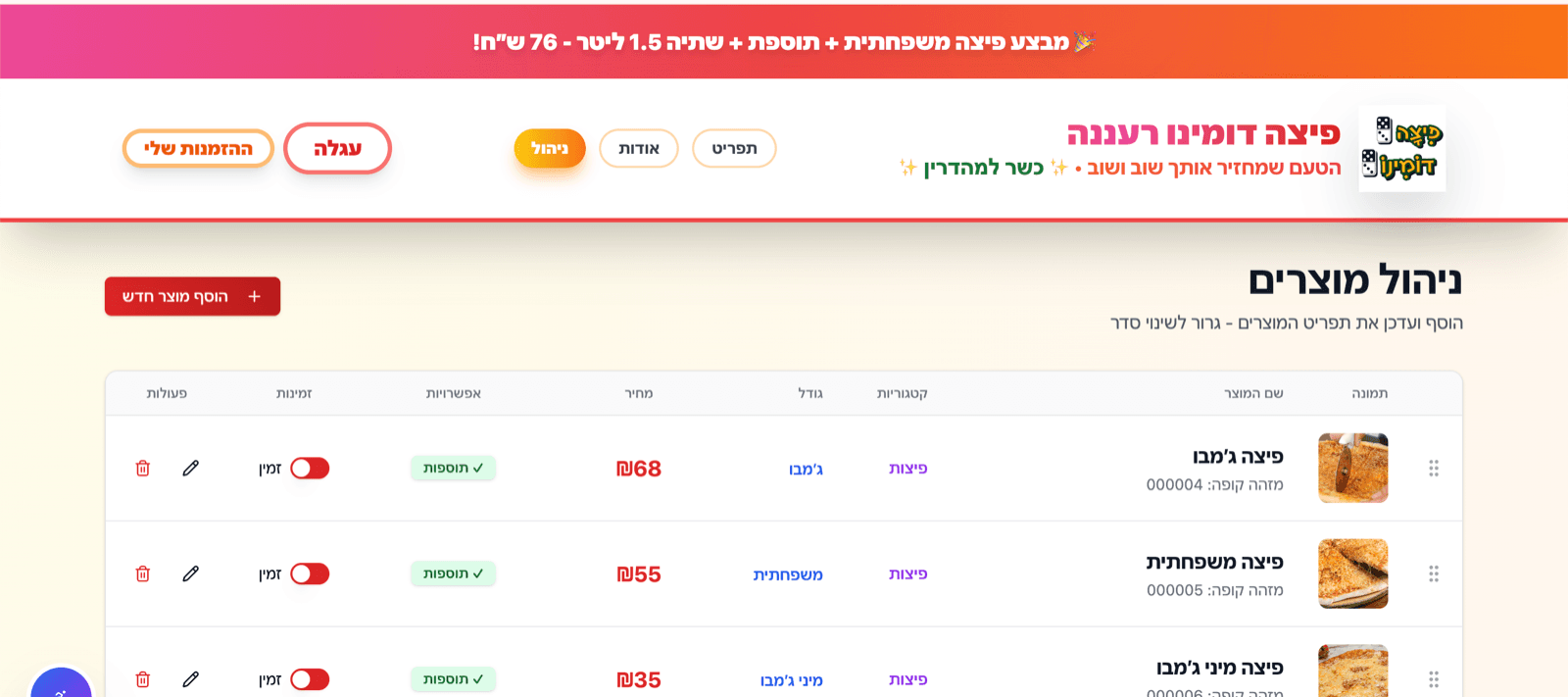
This is easy to underestimate, because the admin side is invisible from outside. The Domino Ra'anana project, about two months in total, shipped management screens for products, deals, categories, pizza sizes, beverages, sauces, delivery zones, site settings and orders. That list is the operational reality of a pizza branch, and every entry is something staff need to change themselves without calling a developer.
The design question inside each screen is which rules the tool enforces and which it leaves to a person. Delivery zones carry a delivery cost and a minimum order amount, so the tool enforces them at checkout. Deals can contain several products with their own selectable options, so the data model has to preserve that structure instead of flattening a deal into a discounted line item — otherwise the admin screen quietly loses the ability to express real promotions.
Handoffs to systems you do not control
The most valuable part of an internal tool is often the point where it hands work to something else. On the Domino build a card order creates a pending order and a Cardcom payment URL, and only a successful payment triggers the rest: the status update, the customer and admin emails, and delivery of the order to the Aviv POS. Orders arrive at the register without anybody retyping them, which the owner, Eran Atra, describes as the biggest change the site has had.
Every handoff needs three answers before it is built: what proves the other system accepted the work, what happens when it does not, and who finds out. Skipping the second and third is how an integration looks finished in a demo and generates phone calls in production.
The parts teams forget to ask for
Roles that match how people actually work
Not a permissions matrix for its own sake. Just enough separation that the person taking orders and the person changing prices are not looking at the same screen.
Exports
Somebody will need the data in a spreadsheet whatever the tool does. Planning for that is what keeps the spreadsheet from becoming a second system of record.
A record of what happened
Domino's own list of next steps includes an internal event timeline per order, so staff can see payment, email and POS handoff status in one place. Nearly every operations tool wants this eventually.
An obvious way to correct a mistake
Somebody will enter the wrong thing. The tool needs a correction path a normal user can find, and it should record that a correction happened instead of silently overwriting the original.
One painful slice first
Version one should cover a single workflow properly. Covering the whole department is what version two is for, once the team has shown you which slice hurt most.
What version one leaves out
Reporting is the usual candidate: dashboards built before anybody has a question to ask of them tend to go unread. So are notifications for events nobody acts on, and permission schemes with more roles than the team has people.
The Domino project's own next steps are a good example of restraint. Pull the checkout rules into shared pure functions, so pricing, minimums and zone eligibility can be tested without rendering a page. Add the per-order event timeline. Add abandoned-cart follow-up only if the branch turns out to lose enough orders to justify it. That last condition is the part most feature lists are missing.
How long this takes
Domino's two months covered both sides: the public ordering flow and the admin and integration work behind it. A purely internal tool — one workflow, one team, a tracker with roles, notifications and exports — is a narrower job than that, because there is no customer-facing surface to design and no payment provider in the path.
What pushes it back toward two months is integration. Every external system the tool has to read from or write into is real work, and the POS handoff was one of the more demanding parts of that build. It is worth pricing the integrations separately in your own head before you judge whether an estimate is high.
Worked example: the operations half of a live ordering site
Customers see a menu. The branch sees a set of screens and an integration that decide whether the day runs smoothly.
- 1Give staff the leversProducts, deals, categories, pizza sizes, beverages, sauces, delivery zones, site settings and orders are all editable in the admin screens, so day-to-day changes never wait on a developer.
- 2Encode the rules that must not be rememberedDelivery cost and minimum order per zone are enforced during checkout rather than written on a note by the phone.
- 3Sequence the money and the kitchen correctlyPending order, Cardcom payment, then status update, emails, cart clear, and POS delivery. Nothing reaches the register before the payment result does.
- 4Keep test paths for the risky edgesThe project includes test pages for payment and POS validation, because those are the two places where a silent failure costs a real order.
Staff run the branch from the tool instead of around it, and the register receives orders directly. The whole build, public side included, took about two months.
Questions we get asked about this
Our process lives in a spreadsheet. Why change it?
Do not change it if it still works. Spreadsheets fail on three specific things: two people editing at once, a rule that has to be enforced rather than remembered, and a status somebody outside the sheet needs to see. If none of those is hurting yet, a tool is premature.
How do we get staff to actually use it?
Build a slice where the tool removes work instead of adding a reporting duty. The Domino admin screens get used because they are the only way to change products, deals, sizes and zones — the tool sits on a path staff already had to walk. Anything that is only useful to a manager tends to get filled in badly.
Can it connect to our POS, accounting, or supplier system?
Often, and it is worth checking before scoping anything else. Cardcom and the Aviv POS both have a defined way in, which is what made the Domino handoff practical. When a system has no documented interface, the honest options are a manual step, a scheduled export, or a different plan — and which one you are in should not be a mid-build surprise.
Who maintains it when our rules change?
Rules that change often should be data your team edits, not code. That is why Domino has screens for zones, prices, sizes and deals rather than a developer editing a config file every time a promotion changes. Genuinely structural changes, like a new workflow or a new integration, are change requests, and they stay small when the first version was scoped and written cleanly.
Typical deliverables
- Custom dashboard or tracker
- Role-based workflows
- Automated notifications
- Exportable reports and handoff notes
Best for
Teams that have a process that works in theory but breaks when volume rises or people get busy.
Discuss this service