Both sides oversell themselves
The no-code world promises that anyone can build powerful software without a developer. The custom-code world implies that serious products must be built from scratch. Both claims are marketing, and both lead businesses astray. The honest position is that no-code and custom code are different tools for different jobs, and the right choice depends entirely on what you are building and how far you intend to take it.
Choosing well saves enormous time and money. Choosing badly is expensive in a specific, painful way: you build something on the wrong foundation, outgrow it, and then pay twice — once to build it and again to rebuild it properly. This guide is meant to help you avoid that second bill.
What no-code is genuinely great at
No-code tools — platforms for building apps, automations, forms, and internal tools without writing code — are excellent when speed and self-sufficiency matter more than control. They let a non-technical person assemble a working tool in days, change it without waiting on a developer, and prove an idea before investing real money. For internal workflows, simple customer-facing tools, and early validation, that is often exactly what a business needs.
If your goal is to test whether people want something, replace a spreadsheet, or automate a handful of repetitive steps, no-code is frequently the smart, cheap, fast answer. Reaching for custom development in those situations can be over-engineering — spending months building what a configurable tool could deliver in a week.
Where no-code starts to hurt
No-code's strengths become weaknesses as a product grows. Because you are working inside someone else's platform, you are limited to what that platform allows. Unusual logic, deep integrations, fine-grained performance, large data volumes, and very specific user experiences are where no-code tools tend to creak, and the workarounds can become more fragile and confusing than real code.
There are also quieter risks. You are dependent on the platform's pricing, uptime, and roadmap; if they raise prices or remove a feature, you have limited recourse. Costs that look cheap at small scale can rise sharply as usage grows. And moving off a no-code tool later is rarely simple, because you usually cannot take the underlying build with you. None of this makes no-code wrong — it makes it important to know when you are approaching its edges.
What custom code buys you
Custom development means building the software itself rather than configuring a platform. It costs more time and skill up front, and it requires someone to maintain it. In exchange, you get control and ownership: the product can do exactly what you need, integrate with anything, scale as far as the architecture allows, and evolve in any direction without asking permission from a platform.
Custom code earns its cost when the software is central to the business rather than a convenience around the edges. If the product is the thing you sell, if it handles meaningful scale or sensitive data, if it needs a distinctive experience, or if it must connect deeply to other systems, custom development is usually the foundation that holds up over years instead of months.
A simple way to decide
Instead of debating the tools in the abstract, ask what role the software plays. If it is a supporting workflow or an experiment, lean no-code. If it is core to how the business makes money and will grow with you, lean custom. The questions below usually settle it quickly.
Lean no-code when
you need it soon, the logic is fairly standard, the audience is small or internal, and you are still validating the idea.
Lean custom when
the product is central to the business, needs unusual logic or deep integrations, must scale, or has to feel uniquely yours.
Consider a hybrid when
you want to validate fast with no-code now while planning a custom build for the parts you already know will need it.
The hybrid path most businesses miss
The choice is not always permanent or all-or-nothing. A common and sensible path is to start with no-code to validate demand and learn how the workflow really behaves, then rebuild the proven core as custom software once you understand it well. The no-code version becomes a detailed, working specification — far more useful than any document — for the custom build that follows.
The mistake to avoid is drifting into a heavy no-code build for something you already know will need custom code, simply because no-code felt easier to start. If the destination clearly requires ownership, scale, or unusual logic, it is often cheaper to begin building the right foundation than to construct an elaborate temporary version you will dismantle. Decide based on where the product is going, not only on what is quickest today.
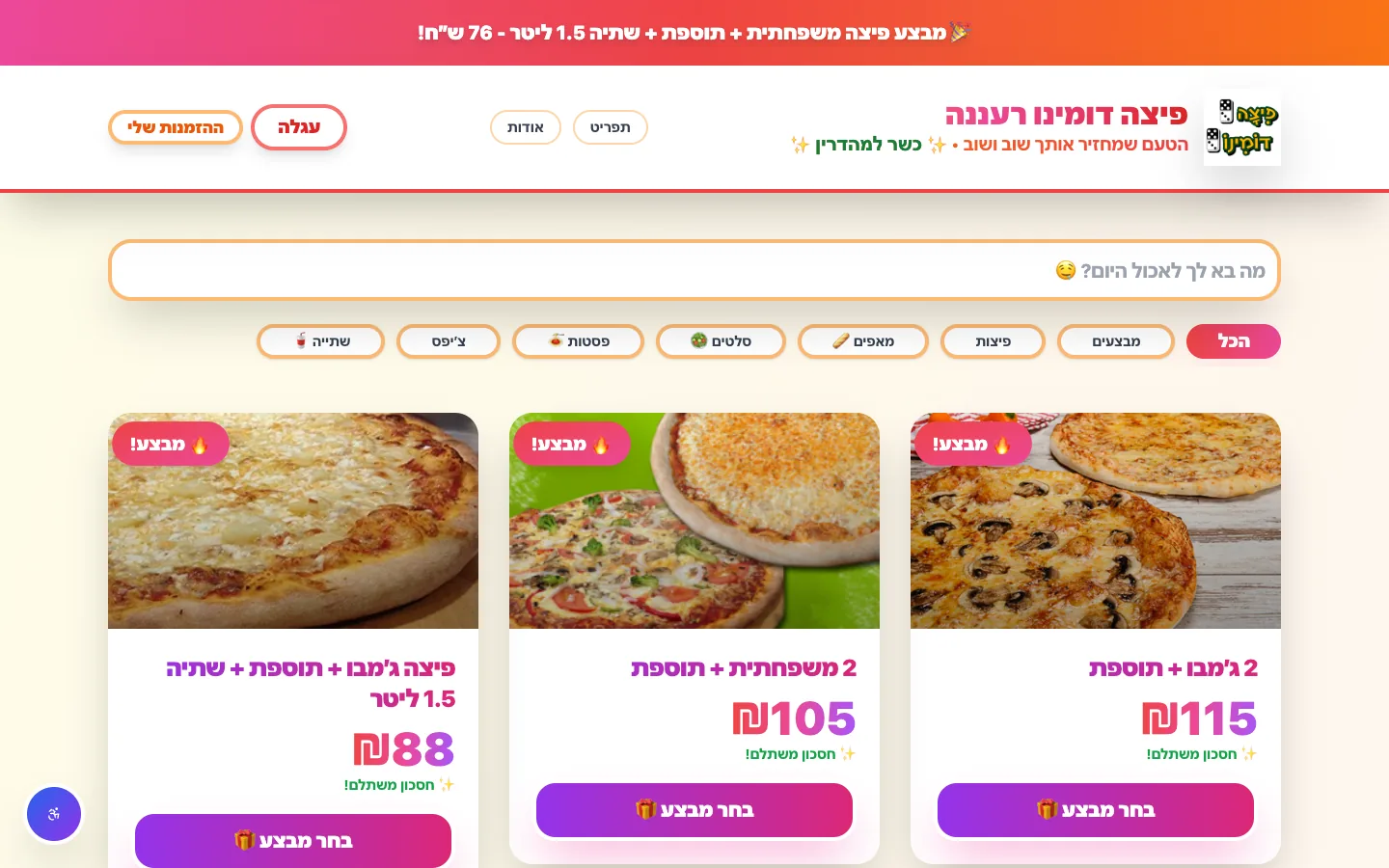 Real build exampleA hybrid build that has run for five yearsDomino Ra'anana pairs a platform foundation with custom code where it matters — Cardcom payments, delivery-zone rules, and a handoff to the Aviv POS. Exactly the hybrid path this section describes.Built in about 2 months · live at domino-rn.co.il
Frequently asked questions
Is no-code secure enough for customer data?
The major platforms invest seriously in security, often more than a small custom build would. The real questions are about your configuration — who has access, what is shared publicly by default — and about compliance: if your industry has specific data-residency or privacy requirements, check the platform can actually meet them before building.
How do I know I'm outgrowing a no-code tool?
The workarounds tell you. When new features take longer to configure than they would to code, when the platform's pricing tier jumps because of your usage, or when you maintain a document explaining the tricks that keep it working — the tool is now costing more than code would.
Can no-code and custom code work together?
Yes, and hybrids are often the best value: a custom core where the business logic is unusual, connected to no-code tools for the standard parts like forms, dashboards, or notifications. You pay for code only where code earns it.
What has WizeApps actually shipped this way?
All three live projects on this site are hybrids in exactly this sense. The Domino Ra'anana ordering site runs on Base44 with custom code where the platform stopped being enough — the payment ordering around Cardcom and the handoff to the branch's POS. Djob pairs the same platform with a separate PostgreSQL matching layer. The platform carries the standard parts; code carries the logic that makes each business different.
About the author
Ohad Mayrom — Founder, WizeApps
Ohad Mayrom is the founder of WizeApps, where he designs and builds booking systems, client intake flows, internal operations tools, and MVPs for small businesses and early-stage founders. He writes plain-language guides to help non-technical owners commission software with confidence.
Connect on LinkedInKeep reading
Thinking about building this?
Tell us what is not working yet. A few clear examples of the current workflow are enough to start a useful conversation.
Start a conversation