The rule that decides whether an order can happen
Domino Ra'anana has taken orders through the site we built for it for more than five years. It took about two months to build, and the owner, Eran Atra, changes the menu, the deals and the delivery areas himself. Customers notice the menu. The piece that decides whether an order is possible at all is much smaller and never gets looked at: a list of delivery zones, each one carrying its own delivery cost and its own minimum order amount.
Those two values per zone are not labels on a checkout screen. They are a gate. Given an address and a cart, they answer one question — can this order be completed as a delivery, or not. Get it wrong and you are not showing a slightly inaccurate fee. You are taking money for an order the branch cannot fill.
"We deliver to these areas" is not yet a rule
Every delivery business already has this rule. It just lives in people. The driver knows which streets are too far to be worth it. Whoever answers the phone knows that a small order to the far end of town does not pay for the drive, and says so politely. None of that survives the move to a website, because on a website there is nobody on the line to make the call.
So the rule has to be written down as data before anyone writes code. In practice that means being specific about four things per zone. Vagueness in any one of them turns into either a checkout that blocks orders you wanted, or a kitchen that receives orders it cannot serve.
The boundary
Which addresses count as being in this zone, described in terms a customer would recognise — a neighbourhood, a street list, a nearby village. If your own staff argue about an address, the software will have the same argument.
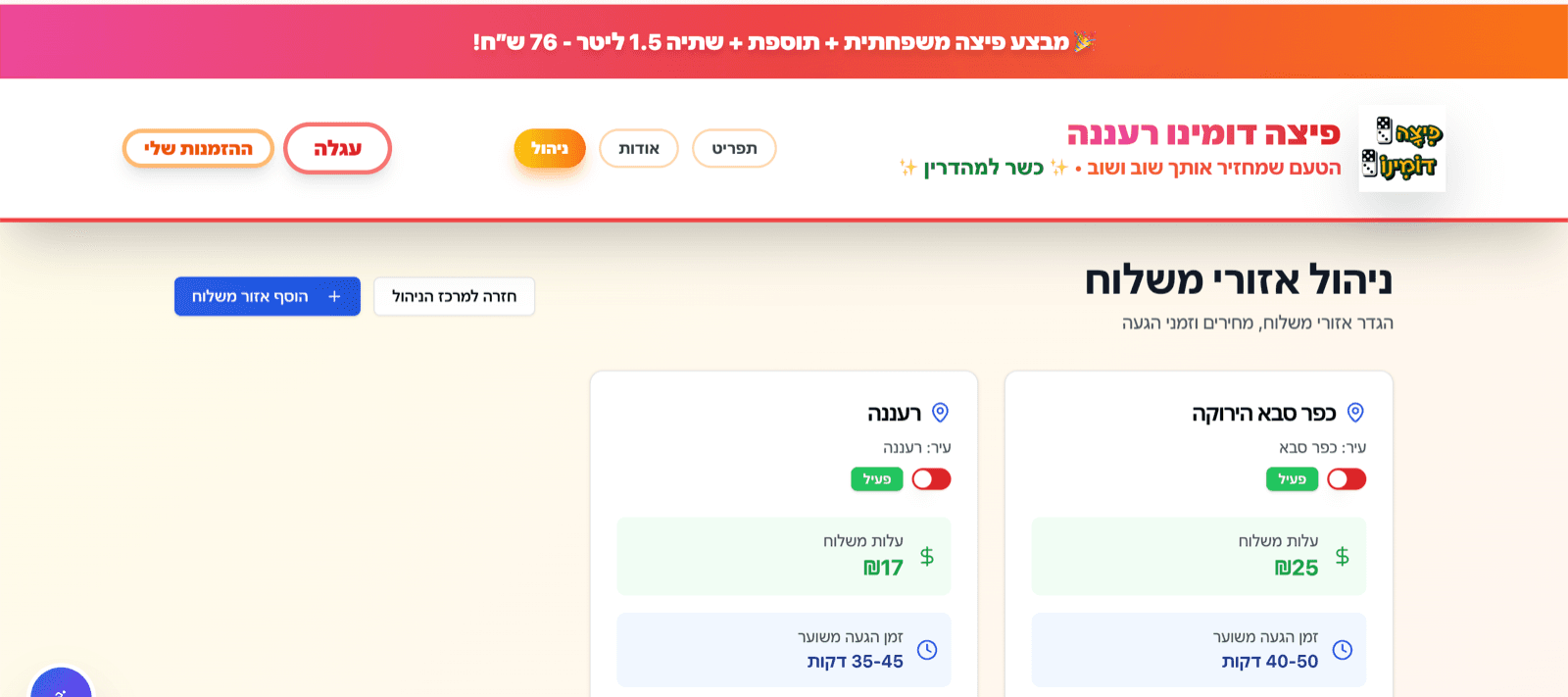
The delivery cost
What delivery to this zone costs. It does not have to be the same number everywhere, and once zones exist there is no reason for it to be.
The order minimum
The smallest cart you are willing to send there. Farther zones usually carry a higher one, because the drive costs the same whether the bag holds one item or six.
The fallback
What happens to an address that is in none of your zones. Silence is the worst available answer. Pickup, a phone number, or a plain "we don't deliver there yet" are all better than a checkout button that quietly refuses to work.
Enforce it before the payment page, not after
The order flow on the Domino site runs in a fixed sequence. A pending order is created first. The customer is sent to Cardcom to pay. Only after payment succeeds does the order get its status update, the confirmation email, and the handoff into the Aviv POS at the branch so nobody retypes it at the register.
That sequence is exactly why the zone rules have to be settled early. Every step after Cardcom is expensive to undo. A refund is a support conversation and a payment fee. An order that has already reached the POS has been seen by the kitchen. You cannot fix that order afterwards — you can only refund it and phone the customer. So eligibility, meaning is this address in a zone and does the cart clear that zone's minimum, has to be decided before the pending order is created.
The site also takes cash orders, which skip Cardcom entirely. That path is shorter, and it is the one people forget when they attach the eligibility check to the payment step: a cash order still lands in the POS and still commits a driver. Two ways to place an order means the zone rule has to sit somewhere both of them pass through, rather than in the card flow because that is where it happened to get written first.
It follows that the check cannot live only in the checkout screen. Whatever code creates the pending order is the last honest place to ask the question, and it should ask it there too, even if the button that leads to it was already disabled.
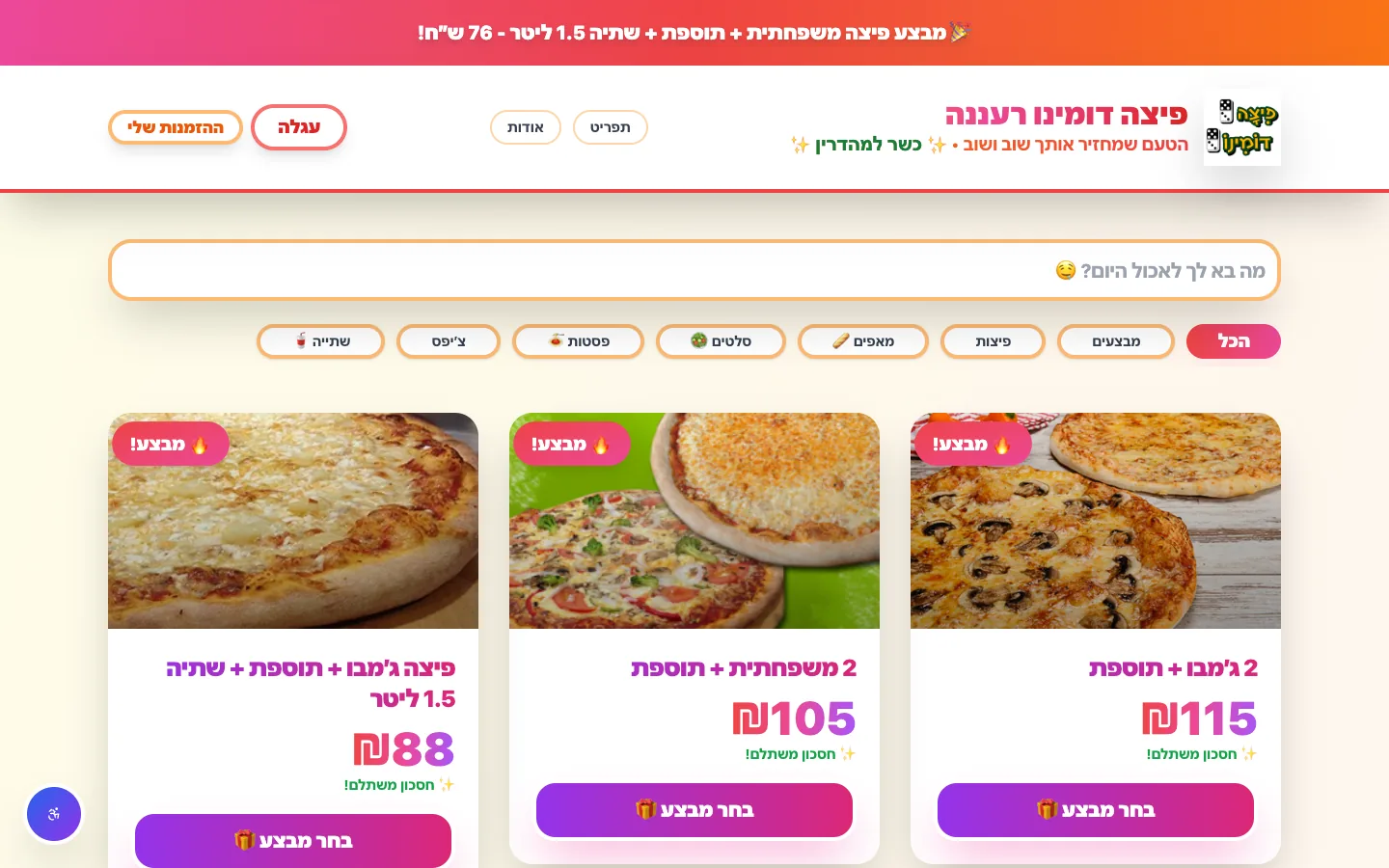 Real build exampleSee the full Domino Ra'anana build teardownThe zone rules described here are one part of a live ordering site: menu, deals, cart, Cardcom payment, the Aviv POS handoff, and the admin screens behind all of it.Built in about 2 months · live at domino-rn.co.il
Three ways to charge for delivery
A zone list with a cost and a minimum attached to each zone is one option out of three, and choosing between them is a business decision more than a technical one. What changes between them is where the ongoing work sits: in deciding boundaries, in an external service, or in absorbing costs quietly.
One flat fee everywhere
- Best for
- A small, tight radius where every delivery costs roughly the same to make.
- Strengths
- Nothing to maintain, and every customer understands it immediately. No boundaries to argue about.
- Tradeoffs
- Near customers subsidise far ones, and there is no natural place to hang an order minimum — so small far-away orders keep arriving.
A zone list, each zone with its own cost and minimum
- Best for
- A branch with a known catchment area and different economics at the edges. This is what Domino Ra'anana runs.
- Strengths
- Two numbers per zone express the whole rule, and each zone can be adjusted without touching the others. Nothing external to call, nothing to go down.
- Tradeoffs
- Someone has to decide where the lines are, and addresses sitting on a line still need a human answer.
Distance or drive-time pricing
- Best for
- A wide service area, or couriers whose cost genuinely scales with the trip.
- Strengths
- The fee tracks the real cost of the delivery instead of approximating it.
- Tradeoffs
- Needs geocoding and a routing service, which means a per-lookup cost, a failure path when the lookup does not answer, and a price the customer cannot predict before entering an address.
Tell the customer the number while they can still act on it
A blocked checkout is only infuriating when it arrives as a surprise at the end. The useful moment is earlier. Once a delivery zone is selected, the cart can show that zone's delivery cost and how far the order still is from the minimum. Now the customer has two reasonable moves — add something, or switch to pickup — instead of one dead end.
One detail matters more than it sounds. Hold on to that state. On the Domino site the cart, the delivery method, the selected zone, the payment method and the checkout form fields are all persisted in localStorage. People order food on a phone while doing something else, and they do reload the page mid-order. Losing the bag and the zone at that point loses the order.
Then there is the address that sits right on a line. Someone is always just outside a zone, and no set of boundaries removes that case. The phone is the answer there — the branch can take the order and charge whatever it thinks is fair. What the site should not do is guess on the customer's behalf, either by quietly stretching a zone or by acting as though the address does not exist. Show which zone was matched, show that zone's cost and minimum, and keep a way to reach a person visible.
The admin screen is the actual feature
Zone rules change. Fuel gets more expensive, a new neighbourhood fills in, a courier arrangement shifts. The build includes management screens for products, deals, categories, pizza sizes, beverages, sauces, delivery zones, site settings and orders, so a delivery cost or a minimum is a field the owner edits in a form.
The alternative is worth pricing out honestly. Our post-launch work is billed hourly, $85 to $165 per hour, for hours actually worked, and we do not sell a standing monthly retainer for a small system like this. Even at the bottom of that range, a hard-coded delivery fee makes every adjustment a paid ticket, a deploy and a wait. Over a site that has been in daily use for more than five years, that is the difference between a number the owner controls and a number he has to book time to change. If you are sizing a build like this, our guide to what a small business app costs lists the ranges we actually quote, and the guide to software maintenance after launch covers what that hourly work usually goes on.
The hours nobody should be typing in every week
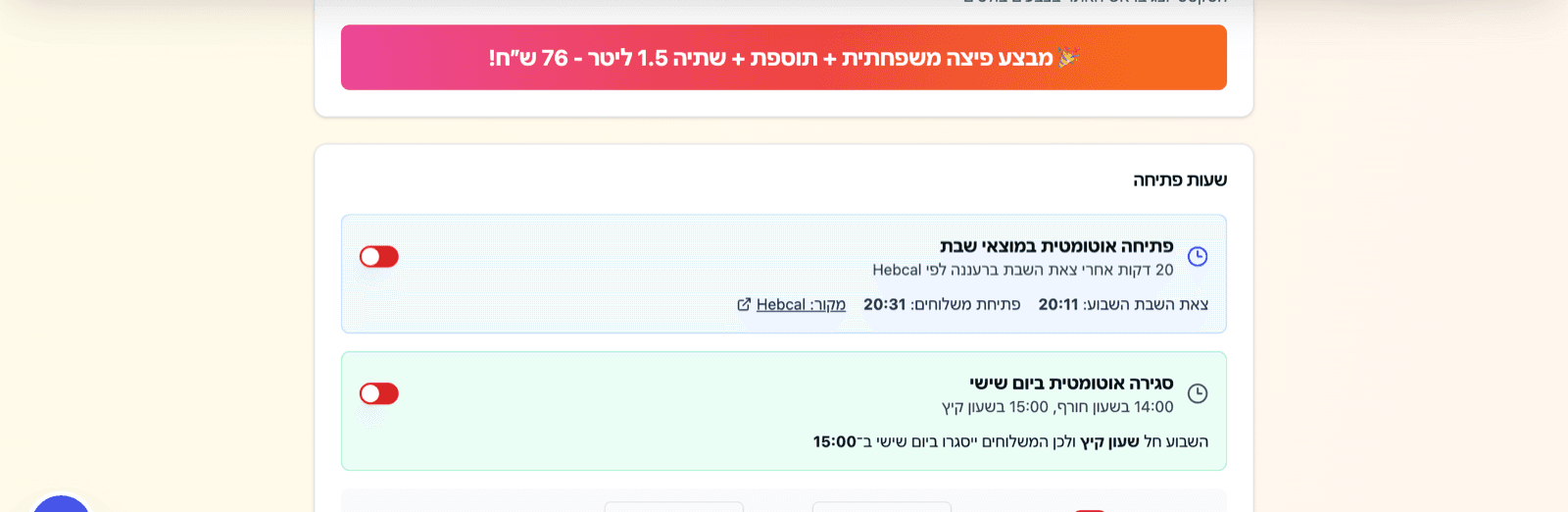
Two settings on that same admin deserve singling out, because they are the ones a manual system gets wrong most often, and they are not really about delivery at all — they are about when the shop is open. Friday closing and Saturday-night opening move every single week, so the system computes them rather than storing them.
Opening is defined as a fixed number of minutes after Shabbat ends in Ra'anana, resolved from the Hebcal API. The screen shows the owner both the Shabbat-end time it read and the opening time it derived, with a link back to the source, so the number is checkable rather than something to be trusted blindly. Friday closing is defined twice — one time under winter clock, another under summer clock — and the screen states plainly which one is in force this week. That last line matters more than it looks. The bug this design prevents is a shop that closes an hour late twice a year, on exactly the two weekends nobody thinks to check.
There is a detail here worth borrowing. Hebcal is the same API behind Mincha Time's prayer-time reminders, another build documented on this site. In one product it decides when to send a notification; in the other it decides when a pizza shop starts taking delivery orders. The engineering is nearly identical — call the source once per location per day, store the answer, derive the local rule from it — and only the business meaning changes. A date-and-time source that a business depends on is worth wrapping once and reusing, rather than re-deriving in every product that needs it.
What we would build differently now
The rule works, but it lives in an awkward place. Most of the zone logic is enforced inside the checkout page, which is the hardest part of the app to test — to confirm that a minimum behaves correctly you have to render the whole checkout and drive it by hand. Starting again, pricing, minimums and delivery rules would go into shared pure functions that can be tested on their own, with the checkout page calling them.
The second change is visibility. Payment, the confirmation email and the POS handoff each happen at their own moment, and when one of them fails the evidence is spread across three places. A per-order event timeline staff can open — payment result, email sent, POS accepted — would make a bad evening explainable while it is still going on.
This is not really about pizza
Any business whose service depends on where the customer is has the same rule hiding inside it. A mobile repair service has a travel radius and a smallest job worth driving to. A caterer has a delivery area and an order floor. A clinic has appointment types it will only do at certain locations. In each case somebody currently makes the call by feel, and the automation only works once that call is written down: a list of areas, and per area, what it costs and what the smallest acceptable job is.
The booking and order flows we build follow the same shape as this checkout. Settle eligibility before anything irreversible happens, and put the numbers where the owner can change them without calling a developer. If you can name your areas and, for each one, state the delivery cost and the smallest order you will send, you already have the rule written. The remaining work is a form and a check in the right place.
Frequently asked questions
Can't we just charge one delivery fee for everywhere?
You can, and for a tight radius it is the right call. The problem appears as the area grows: near customers subsidise far ones, and a flat fee gives you nowhere natural to attach a minimum. Zones are what let the far edge of the map carry both a higher fee and a higher floor without changing anything for the customers next door.
Should the minimum count the delivery fee or only the food?
Pick one and make sure the site and the staff give the same answer. Most businesses mean the food total, because that is what they are judging as worth the drive. Whichever you choose, the number shown while the customer is shopping has to be measured the same way as the number the checkout enforces. The mismatch, not the rule, is what generates support calls.
What should happen when an address is not in any zone?
Say so plainly and offer whatever alternative you actually have. On the Domino site, pickup is a full path through the same cart, so an address outside the delivery zones does not have to be the end of the order. The failure mode to avoid is a checkout that refuses to continue without explaining why.
Who should be able to change the zones?
The owner, or whoever runs operations, through an admin screen and without a developer in the loop. That is how it works at Domino Ra'anana: delivery zones sit alongside products, deals and site settings in the management screens. Anything that changes with the seasons should not need a deploy.
How long does this part take to build?
It is rarely a project of its own. The whole Domino ordering site — menu, deals, cart, checkout, Cardcom payment, the POS handoff and the admin screens — took about two months, which at our published rate of $5,000 to $10,000 per estimated month of work puts it in the $10,000 to $20,000 range. The zone rules are a small slice of that. The slow part is agreeing on the boundaries and the numbers, and that work is yours rather than a developer's.
About the author
Ohad Mayrom — Founder, WizeApps
Ohad Mayrom is the founder of WizeApps, where he designs and builds booking systems, client intake flows, internal operations tools, and MVPs for small businesses and early-stage founders. He writes plain-language guides to help non-technical owners commission software with confidence.
Connect on LinkedInKeep reading
Thinking about building this?
Tell us what is not working yet. A few clear examples of the current workflow are enough to start a useful conversation.
Start a conversation